
Diff view
The diff view compares two JSON documents and shows what was added, removed or changed. Switch to it using the diff tab in the header (route /diff).
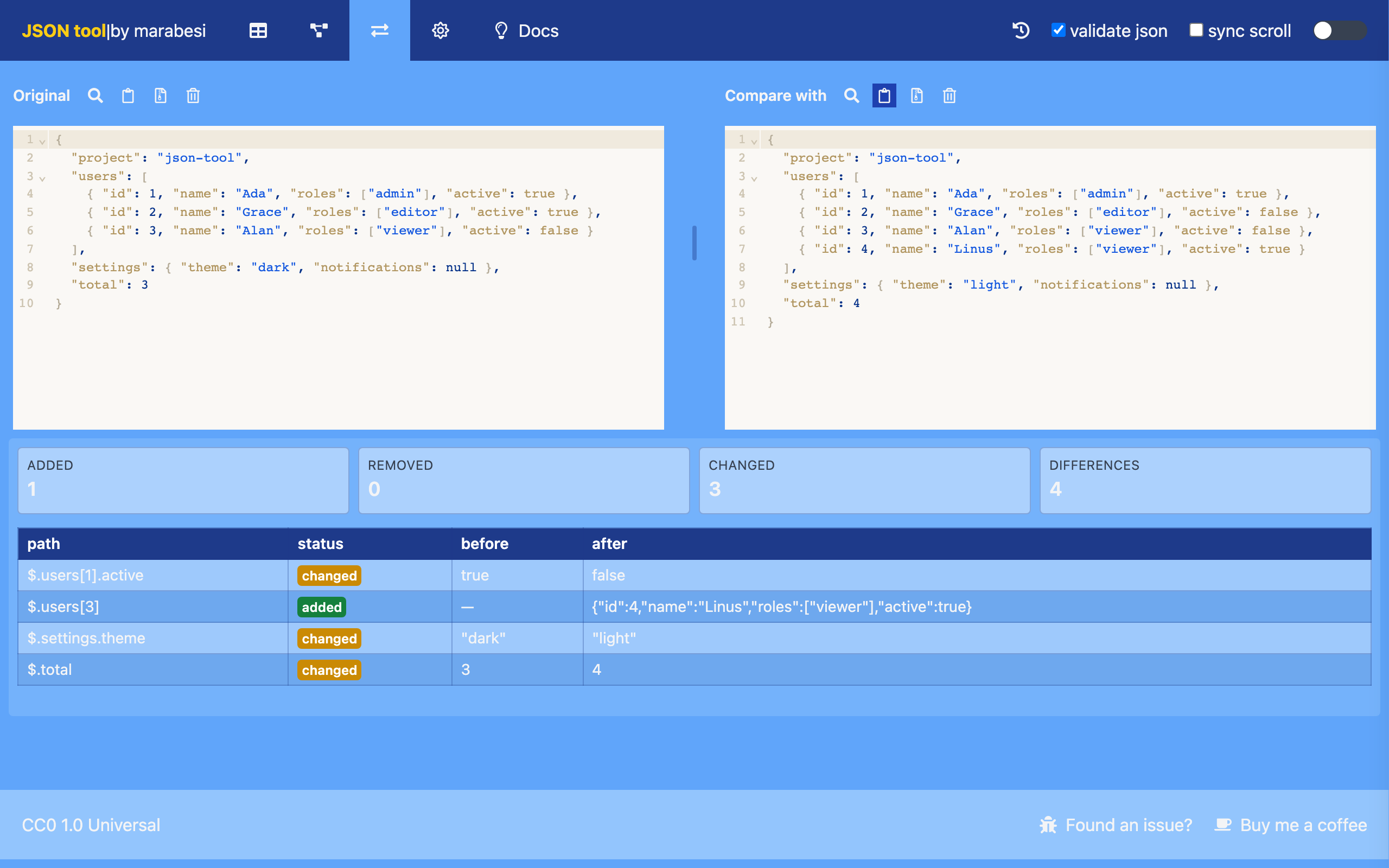
The left editor holds the original document and the right editor holds the document to compare with. Both editors are resizable, support search, clipboard paste, file upload and clearing, just like the editor on the home view. The original document is the same working JSON used by the home, table and shape views.
Results
The summary shows how many differences were found:
| Statistic | Meaning |
|---|---|
| Added | Values that exist only in the compared document |
| Removed | Values that exist only in the original document |
| Changed | Values that exist in both documents but are different |
| Differences | Total number of added, removed and changed entries |
Each difference lists its path, status, and the before and after values. A missing side is shown as —.
When both documents are identical, the view shows No differences. Both documents are identical.
Paths
Paths use a JSONPath-like notation:
$is the root document.- Object properties are joined with a dot:
$.user.name. - Array elements use their index:
$.users[0].name.
Arrays are compared by index. For example, when the item at index 1 changes, the difference is reported at $.items[1]; extra items are reported as added and missing items as removed.
Validation
If either document is not valid JSON, the view reports invalid json instead of the differences. Paste valid JSON in both editors to compare them.